
- Published on
What is UML? Unified Modeling Language Explained with Diagrams and Examples
Table of Contents
- 🧠 Why UML Matters
- ✅ Key Benefits of Using UML
- 🧭 UML Helps in Two Key Areas
- 🏗️ 1. Structural Diagrams
- 🔄 2. Behavioral (Interaction) Diagrams
- 🎓 Diagrams You Need to Know (As a Beginner)
- ✅ 1. Use Case Diagram
- ✅ 2. Class Diagram
- ✅ 3. Activity Diagram
- ✅ 4. Sequence Diagram
- 🛠️ UML in Action: Sample Scenario
- ✅ Summary
- 💬 Next Step
UML, or Unified Modeling Language, is a standardized visual language used to model, design, and document the structure and behavior of software systems—especially those based on object-oriented programming.
UML acts as a blueprint for software design, helping developers, business analysts, and architects understand and communicate system designs more clearly.
🧠 Why UML Matters
Designing software is like building a house. Before construction starts, you need a plan. UML is that plan—made up of diagrams that explain how the software will behave and how different components will interact.
✅ Key Benefits of Using UML
| Benefit | Description |
|---|---|
| 🔍 Clarity | Provides a clear visual model of the system’s design. |
| 🧩 Modularity | Helps break down complex systems into manageable parts. |
| 🗣️ Better Communication | Developers, analysts, and stakeholders can speak the same "visual" language. |
| 🌐 Platform Independent | UML works across all programming languages and technologies. |
| 🔁 Easy Handover | Helps new team members quickly understand the system. |
🧭 UML Helps in Two Key Areas
UML diagrams are split into two main categories:
🏗️ 1. Structural Diagrams
These describe what the system is—its components and how they are related.
- Class Diagram: Shows classes and their relationships.
- Object Diagram: Shows instances (objects) of classes.
- Package Diagram: Organizes classes into groups.
- Component Diagram: Shows components and dependencies.
- Deployment Diagram: Models system’s physical deployment.
- Composite Structure Diagram
- Profile Diagram
🔄 2. Behavioral (Interaction) Diagrams
These describe what the system does—how it behaves, flows, and responds.
- Use Case Diagram: Shows system functionality from the user’s perspective.
- Activity Diagram: Models workflows and processes.
- Sequence Diagram: Shows how objects interact over time.
- State Diagram: Displays states and transitions of an object.
- Communication Diagram
- Interaction Overview Diagram
- Timing Diagram
🎓 Diagrams You Need to Know (As a Beginner)
In this course or blog series, we’ll focus on 4 commonly used diagrams:
✅ 1. Use Case Diagram
- Purpose: Show what a system does from the user's (actor's) point of view.
- Real-world analogy: Think of a restaurant menu that lists what a customer can order.
- Example: A shopping system might have use cases like Login, Add to Cart, Checkout.
✅ 2. Class Diagram
-
Purpose: Show the structure of the system using classes, attributes, and relationships.
-
Analogy: Like blueprints for creating objects in the system.
-
Example:
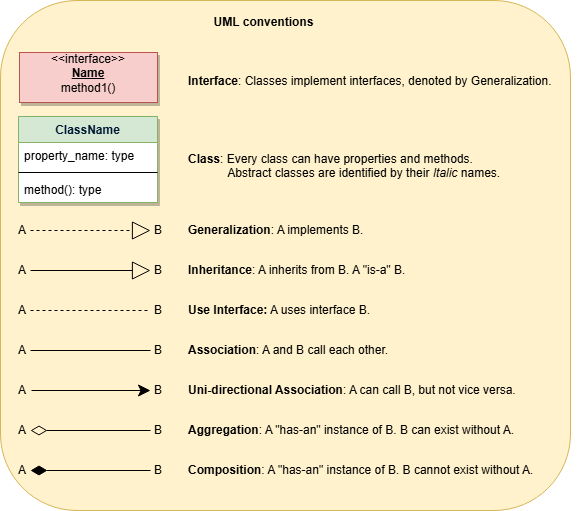
+--------+ +--------+ | Customer|<>-----| Order | +--------+ +--------+- Customer “has a” relationship with Order
✅ 3. Activity Diagram
- Purpose: Represent the flow of control or business logic.
- Analogy: Like a flowchart of steps in a task.
- Example: Login process → Validate → Show dashboard → Load data
✅ 4. Sequence Diagram
-
Purpose: Model how objects interact over time, focusing on message exchange.
-
Analogy: Like a script showing who says what and when.
-
Example:
User -> LoginController: enterCredentials()
LoginController -> AuthService: validate()
AuthService -> DB: fetchUser()
🛠️ UML in Action: Sample Scenario
Let’s model a Library Management System.
-
Use Case Diagram:
- Actors: Librarian, Member
- Use Cases: Borrow Book, Return Book, Register Member
-
Class Diagram:
- Classes: Book, Member, Loan
- Relationships: Member borrows Book through Loan
-
Activity Diagram:
- Steps: Search Book → Check Availability → Issue Book
-
Sequence Diagram:
- Interaction: Member → System → BookService → LoanService
✅ Summary
UML is essential for designing, understanding, and communicating object-oriented software systems. It helps teams visualize structure and behavior before writing any code. With diagrams like Use Case, Class, Sequence, and Activity, UML brings clarity to complex systems.
💬 Next Step
Ready to draw your first UML diagram? Stay tuned for our next post on how to create a UML Class Diagram step-by-step using free tools like draw.io or Lucidchart.
Discussion (0)
No comments yet. Be the first to start the conversation!
Discussion (0)
No comments yet. Be the first to start the conversation!